.webp?width=48&height=48&name=yutong-nan%20(1).webp)

As an admin, it’s not easy to give every user the right access to the platform, especially when managing multiple teams, departments, or regions.
To turn hassle into dazzle, the recent improvement on GetAccept’s user management page gives admins an easier time managing their users across entities and sub-entities. It allows the admin on the main entity to see all users both on the main entity and the connected sub-entities, check their status, and perform actions to all users directly from the main entity.
This new feature saves admins from the trouble of jumping through entities to manage users. Instead, it offers a clear overview of all users and a simplified user management process.
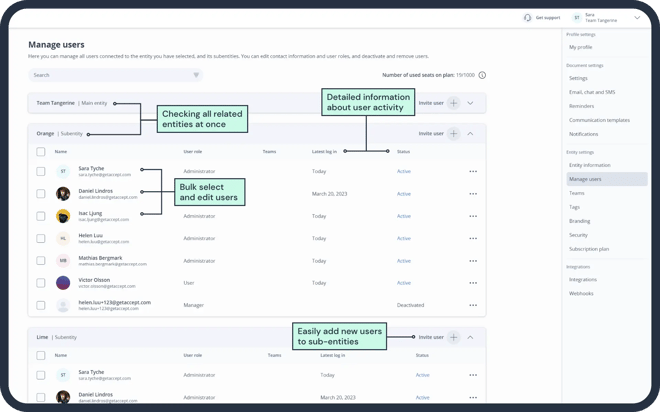
Here are some detailed functionalities:
- Check and manage all users from all related entities;
- Identity non-active users by checking newly-added information, e,g, last log-in;
- Bulk edit multiple users at the same time, for example, activating, deactivating, deleting;
- Entity Overview: Show what plan each entity is on and the number of users on the plan;
- Add new users to sub-entities directly from the main entity.
.webp)


.png)